AUTEL SO534-CN Adapter Vci Maxisys Tablets
fits make: Can.
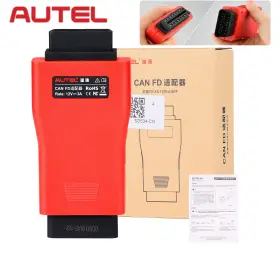
( Brand: Autel ), ( Manufacturer Part Number: SO534-CN ), ( Connectivity: Usb ), ( Custom Bundle: No ), ( Features: User Friendly ), ( Features 1: Original Autel Brand Tool ), ( Features 2: Support Can Fd Protocol ), ( Features 3: Combined With All Autel Vci To Communicate With Applicable ), ( Features 4: Work With Vci 100/vci Mini/wireless Diagnostic Interface ), ( Features 5: Prior To Use, Update The Vci With The Latest Firmware ), ( Modification Description: Autel Can Fd Adapter ), ( Obd Interface: Obd ), ( Support: Can Fd Protocol ), ( Type: Autodiagnostic Tool ), ( Vehicle Type: Passenger Vehicle ), ( Vehicles Supported: Support Diagnosis Of Vehicle Models With Can Fd Protocol ), ( Warranty: 3 Year ), ( Work For: Maxisys Series Tablets )
Review AUTEL Can Fd Adapter Compatible Vci Work For Maxisys Series Tablet's
The Autel SO534-CN Adapter VCI MaxiSys Tablet is an essential tool for vehicle diagnosis and repair, designed to provide technicians and automotive enthusiasts with an accurate and comprehensive analysis of their vehicles' systems. This adapter is compatible with the Autel MaxiSys MS906TS, MS908P, and MS909TS tablets, expanding their capabilities to support a wide range of European, Asian, and American vehicles buying the Autel SO534-CN adapter is an investment in the ability to diagnose and repair a diverse range of vehicle makes and models.
The SO534-CN Adapter features a fast and stable connection through its CAN, K Line, and J1850 PID support. With high-speed communication, it enables the tablets to read and clear codes, perform real-time data monitoring, and execute bi-directional control functions. The adapter also supports various protocols such as MAF, ABS, SRS, airbag, and battery management systems, making it a versatile solution for diagnosing complex issues.
The design of the SO534-CN Adapter is compact, providing convenience for technicians during repairs. Its robust build ensures durability, allowing it to withstand the demands of a professional repair environment. It comes with a convenient mounting bracket that securely holds the adapter in place while in use, allowing for easy access to vehicle connectors and minimizing cable clutter.
The adapter's compatibility extends to both OBD-II and J1939 vehicle platforms, catering to a vast array of vehicle types, including light trucks, heavy-duty trucks, and stationary engines. This adaptability makes the Autel SO534-CN Adapter VCI MaxiSys Tablet an essential addition to any automotive workshop or toolkit.
With the SO534-CN Adapter,users can perform a variety of tasks with ease, from reading and clearing codes to inspecting live data streams, setting and resetting service milestones, and much more. The high-quality construction, ease of use, and comprehensive compatibility make the Autel SO534-CN Adapter VCI MaxiSys Tablet an indispensable asset for professional technicians or hobbyists who demand precision and reliability in their vehicle diagnostic tools.
Autel SO534-CN Adapter for MaxiSys Tablets: Pros and Cons
Autel SO534-CN Adapter is a scanning tool designed for MaxiSys tablets. This adapter enables the tablets to communicate with European, Asian, and domestic vehicles, thus expanding the diagnostic capabilities of the tablets. Here are some advantages and disadvantages of buying a Autel SO534-CN Adapter for MaxiSys tablets:
Pros:1. Versatility: The Autel SO534-CN Adapter supports a wide range of vehicle makes and models, including European, Asian, and domestic vehicles. This makes it a valuable tool for automotive repair shops or professionals who work on various types of vehicles.
2. Cost-effective: The SO534-CN Adapter is a more affordable option compared to individual diagnostic tools for each specific vehicle make or model. Therefore, it can save businesses or professionals money in the long run.
3. Compatible with multiple MaxiSys tablets: The SO534-CN Adapter is compatible with various MaxiSys tablets, making it a convenient choice for those who already own or plan to purchase one.
4. Easy to use: The adapter is straightforward to use, and the initial setup process is simple. Once connected to the vehicle, the MaxiSys tablet will automatically identify the vehicle's make and model and load the appropriate software.
5. Firmware updates: The Autel SO534-CN Adapter can be updated with the latest software, ensuring that the tool remains current and effective even as vehicle technologies evolve.
Cons:1. Limited functionality with some software: Some software features may not be available when using the SO534-CN Adapter, depending on the specific vehicle make and model being diagnosed. This may result in needing to use other tools or methods to complete certain repairs.
2. Connectivity issues: Occasionally, connection issues between the adapter and the vehicle or the MaxiSys tablet may occur. While troubleshooting steps can be taken to resolve these issues, they can cause delays and additional steps in the diagnostic process.
3. Complex vehicle key systems: For vehicles with complex key systems, such as keyless entry and start systems, the Autel SO534-CN Adapter may not be able to program or reprogram keys, requiring additional tools or services.
Conclusion:Autel SO534-CN Adapter is a valuable tool for automotive repair shops or professionals who require diagnostic capabilities for a wide range of vehicle makes and models. Its versatility, cost-effectiveness, and compatibility with multiple MaxiSys tablets make it an attractive option. However, users should be aware of its limitations, such as potential connection issues and limited functionality with some vehicle software features. Ultimately, the Autel SO534-CN Adapter can be a crucial investment for professionals looking to expand their diagnostic capabilities without breaking the bank.
Recommendation:If you require diagnostic capabilities for various makes and models of vehicles, the Autel SO534-CN Adapter for MaxiSys tablets is worth considering. However, it is essential to understand the limitations of the tool and weigh them against your specific diagnostic needs. Additionally, keeping the adapter up-to-date with the latest software is crucial to maintaining its effectiveness.
Details:
Next, tap the VCI firmware version and if an update is available, Update for new to install. Autel has just released a CAN FD Adapter that connects to compatible Vehicle Communication Interfaces Cis enable its tablet's communicate via the communications protocol and diagnose vehicle. To communicate with applicable vehicles. What You Should Know About Autel Can FD Adapter.
SUPPORT CAN FD PROTOCOL Autel Adapter is designed to support diagnosis of vehicle model's with protocol, including the MY2020 GM. Autel CAN FD Adapter Chinese Version Compatible with VCI work for Maxisys Series Tablet's. Tap the VCI icon on Tablet toolbar. PORTABLE EASY TO USE This CAN FD Adapter is compact, portable and easy to use.
Once completed, follow the instructions displayed and reboot VCI by detaching USB cable from then plug back into. The tablet will then connect to the VCI. The CAN FD Adapter from Autel is designed to connect compatible vehicle communication interfaces Cis enable its tablet's communicate via the flexible data-rate communications protocol and diagnose. COMPATIBLE WITH AUTEL VCI The adapter is compatible with a supported Autel vehicle communication interface VCI, including Autel Maxi Flash Elite J2534-VCI, Wireless Diagnostic Interface, 100 and Mini.
Attach the supplied USB cable to MaxiSYS tablet. A progress bar will display as the update is installed. A message will display once the VCI update is completed. Step1: Connect the main cables female adapter to vehicle Data Link Connector DLC on VCI unit and tighten captive thumb screws.
To update the VCI, use power supply and plug in MaxiSYS tablet to electrical outlet. The package box language is Chinese and label on main unit also Chinese,but the of device English,it doesn't effect to use. Prior to Use, Update the VCI with The Latest Firmware. Autel CAN FD Adapter is a must-have connector for checking the newer GM vehicles.
Autel USA says CAN FD is one of the newer communication protocols, noted for being faster, more reliable and secure. Step 2: Connect the CAN FD Adapters 16-PIN female connector to main cables male adapter. Small Size and Easy to Carry, Superior Flexibility Durability.
part #: so534 price
- $59.95
specifications diagitools:
- for makes: Can
- brand: Autel
- mpn: So534-cn
- connectivity: Usb
- custom bundle: No
- features: User Friendly
- features 1: Original Autel Brand Tool
- features 2: Support Can Fd Protocol
- features 3: Combined With All Autel Vci To Communicate With Applicable
- features 4: Work With Vci 100/vci Mini/wireless Diagnostic Interface
- features 5: Prior To Use, Update The Vci With The Latest Firmware
- modification description: Autel Can Fd Adapter
- obd interface: Obd
- support: Can Fd Protocol
- type: Autodiagnostic Tool
- vehicle type: Passenger Vehicle
- vehicles supported: Support Diagnosis Of Vehicle Models With Can Fd Protocol
- warranty: 3 Year
- work for: Maxisys Series Tablets
shipping diagitools:
- cost: $0.00
- transit: 3-8 Days
- type: Fixed
- class: Standard
- service: Standard
seller diagitools:
- # reviews: 6165
- rating: 98.0%
- city: Perth Amboy, New Jersey
payments diagitools:
- credit card: Diners-club
- other
- wallet: Paypal
returns diagitools:
- policy: Returns Accepted
- paid by: Seller
- time: 30 Days
offer diagitools:
- options: Ship-to-home
- availability: In Stock
- started: December 11, 2024
- sold: 0
- best offers: True
general diagitools:
- Automotive Tools Supplies > Diagnostic Service Tools > Other Diagnostic Service Tools
- condition: New
Autel SO534 Is Similar To:
- Autel Apb112 Smart Key Simulator For Programmer Untested Powers On (35.4% similar) Share this offer with someone who wants it. Key features: - smart key simulation: ability to simulate smart functionality for diagnostic and programming tasks. It can also simulate various vehicle key chips for diagnostic and programming purposes. Chip compatibility: the simulator currently...(May 14th, 2024)
- Autel 849438004958 Aulmsultra Maxisys Ultra Diagnostic Tablet With Advanced Vcmi (38.5% similar) The condition of the item you are purchasing will clearly be marked on listing page. Autel maxisys ultra diagnostic tablet with advanced vci Autel, certified refurbished fully functional fully-functional product in like new/very good condition that may or not have minor cosmetic...(May 28th, 2024)
- Autel Ia900ldw Maxisys Adas Lane Departure Warning Calibration Tool (30.7% similar) However, keep in mind that the shine may make it look slightly different and due to color wear tear of your wheel. The color differences are usually minimal and not noticeable, but they do exist. Color matching. The effect of brake dust and road debris can be seen on a car with just few weeks...(November 13th, 2024)
- Autel Autel-csc0602 01 Maxisys Adas Reflector (39.7% similar) Positions the calibrate radar for VW, Porsche, BMW, Nissan, Infiniti, Hyundai and KIA vehicles. Please view the picture before purchasing. What you see in the pictures is what would receive. Item is in good working condition...(December 5th, 2024)
- Autel K001so534 Can Fd Adapter For Mx808 mk808 mk808s mk808ts mx808ts mp808 ds708 ds808 (41.7% similar) To update the vci, use power supply and plug in maxisys tablet to electrical outlet. Buyer pay the shipping cost. Support can fd protocol Autel adapter is designed to support diagnosis of vehicle model's with protocol, including the MY2020 gm. Small size and easy to carry, superior flexibility...(December 9th, 2024)
- Autel Sk282bea01 Xp400 Pro Chip Coding Immo Work For Im508 Im608 im608 (36.6% similar) One-tap online programming. For BMW fem/BC k-EU learning and adaption. Engine ec.u read/ write. Package list. Fit for vols-wage/ Audi. 4.ENABLES programming of infrared k-yes for Mercedes vehicles and ic chip on late model Hyundai KIA. Advanced programming functions. Fit for Mazda...(December 12th, 2024)
- Autel So344-b Maxivideo Mv108s 8.5mm Digital Inspection Camera Work With Maxisys (41% similar) Usb cable connects the digital inspection camera to maxisys tablet or PC for data analyzing. White led lights to illuminate the inspection areas. MV108S can work with Autel tablet's such as maxisys ultra, ultra lite, maxisys elite ii, maxi com MK908P, MK908, MS906BT, MK906BT, MS906TS, MS906 pro...(December 16th, 2024)
- Autel Sp405ea01 Maxivci V200 Vci Bluetooth Diagnostic Interface Fit For Ms906 Pro Its600 (36.5% similar) Vehicle/connection led. Autel maxi vci V200 wireless diagnostic interface is a small box used to connect vehicles connector DLX and tirelessly with the maxisys display tablet, as well standalone PC, vehicle communication vci for data transmission. Enables the Autel tablet's to connect vehicles...(December 18th, 2024)
- Autel 712217364409 Maxivci V200 Obd Connector Car Communication Interface For Mk906 Pro Km100 (36.8% similar) Solid blue: the vci is connected via Bluetooth. Flashing blue: the vci is communicating via Bluetooth. Consult a licensed mechanic or automobile service center. The Cl is powered on and performing self-check. Pull off the roadway immediately or as soon it is safe to...(December 19th, 2024)
- Autel 712217364393 Maxivci Mini Vci Wireless Diagnostic Tool For Mk808bt Mk808tsmk808bt (33.3% similar) Note: the power led briefly lights red each time the device powers on and then green when is ready. Update Autel maxi vci mini. The tablet in this advertising is not included. The p-c will automatically recognize the maxi vci mini. Broad compatibility: it can work with Autel MK808BT/...(December 20th, 2024)
- Autel Ms908cv1yrup Maxisys Ms908cv One Year Total Care Program Tcp Subscription And Warranty Card (25.8% similar) Color, height , length , UPC...(December 23rd, 2024)
