XHORSE XDMB11EN Benz Vvdi Mb Elv Emulator Esl Simulator 5X W204/W207/W212
fits model: W204, W212. make: Mercedes.
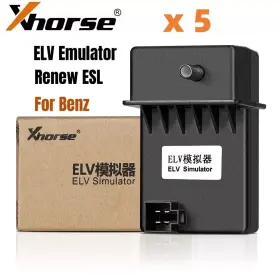
( Brand: Xhorse ), ( Manufacturer Part Number: XDMB11EN ), ( Country/region Of Manufacture: China ), ( Custom Bundle: No ), ( Obd Interface: Can, Eobd, Obd, Obdii ), ( Type: Elv Emulator ), ( Vehicle Type: Passenger Vehicle ), ( Warranty: 1 Year )
Review XHORSE 5x Vvdi Mb Elv Emulator Esl Simulator For Mercedes Benz W204/w207/w212 fits W204 W212
The Xhorse XDMB11EN 5x VVDI MB ELS Emulator is a state-of-the-art device designed for Mercedes-Benz W204, W207, and W212 vehicle models. This innovative product functions as an Emulation Interface between the vehicle's on-board data bus (CAN bus) and external multimedia systems, allowing seamless integration and operation of aftermarket or original OEM multimedia systems.
This emulator boasts 5x VVDI (Vehicle-to-Vehicle Interface) connections, ensuring compatibility with a wide range of multimedia systems and a simple, plug-and-play installation process. The device is specifically engineered for Mercedes-Benz ELS (Entertainment and Logic System), offering manufaturer-level functionality and compatibility.
Key Features:- Five VVDI connections for various multimedia systems
- Designed for Mercedes-Benz W204, W207, and W212 models
- Compatible with both aftermarket and OEM multimedia systems
- Seamless integration with the vehicle's data bus
- Plug-and-play installation process
- Supports various multimedia functions, including audio, video, navigation, and climate control
- Superior sound quality and high-definition video display
- Easy-to-use interface and easy configurations through a PC or a mobile application
With the Xhorse XDMB11EN 5x VVDI MB ELS Emulator, upgrading your Mercedes-Benz multimedia system becomes a hassle-free experience. This emulator ensures a perfect fit, top-notch performance, and unparalleled user experience. Whether you are seeking enhanced sound quality, superior multimedia capabilities, or a more intuitive user interface, the Xhorse XDMB11EN is the ideal solution for your vehicle. Upgrade today and enjoy a more connected and enjoyable driving experience.
Pros and Cons of buying a XHorse XDMB11EN 5X VVDI MB ESL Simulator for Mercedes-Benz W204, W207, and W212
I. IntroductionThe XHorse XDMB11EN 5X VVDI MB ESL Simulator is an aftermarket tool designed for diagnosing and coding Mercedes-Benz vehicles with W204, W207, and W212 chassis. This device can save you time and money by allowing you to perform functions that would otherwise require a visit to the dealer. This section discusses the pros and cons that might help you make an informed decision about purchasing this tool.
II. Pros1. Compatibility: This tool supports a wide range of models, including C-Class (W204), E-Class (W207), and S-Class (W212) Mercedes-Benz vehicles.
2. Diagnostic Capabilities: The XDMB11EN can read and clear codes related to various systems, such as ABS, airbag, engine, transmission, and immobilizer.
3. Coding Functionality: This tool can also deliver various coding functions, such as programming keys, adapting components, and setting parameters according to your preferences.
4. User-friendly: According to user reviews, the XDMB11EN is easy to use, even for those with no prior experience in diagnosing and coding cars.
5. Cost-effective: Compared to dealer visits and paying for their services, using an aftermarket tool like the XDMB11EN can potentially save you both time and money.
6. Interactive Software: The tool benefits from regular updates, ensuring that it covers the latest features and vehicle systems.
III. Cons1. Initial Learning Curve: While considered user-friendly, there might still be an initial learning curve to fully understand all the functions and features offered by the tool.
2. Software Updates: Occasional updates might require an additional cost to ensure the compatibility with the latest vehicles or software features.
3. No Official Mercedes-Benz Support: As this is an aftermarket device, any issues or questions may need to be addressed through the XHorse customer support instead of contacting Mercedes-Benz directly.
4. Hardware Lock: There is a risk of the device being locked (bricked) if used incorrectly, especially when making certain types of codes (some of which are not allowed by Mercedes-Benz).
IV. ConclusionThe XHorse XDMB11EN 5X VVDI MB ESL Simulator can offer a valuable investment for vehicle owners seeking to diagnose and code their W204, W207, and W212 Mercedes-Benz models at their convenience but come with some limitations, including a learning curve and the possibility of hardware lock. By weighing the pros and cons and assessing your personal requirements, you can make an informed decision about whether this tool is right for you.
V. RecommendationIf you are comfortable with the risks and consider the potential benefits, the XHorse XDMB11EN 5X VVDI MB ESL Simulator appears to be a worthwhile investment as it offers a cost-effective solution for diagnostic and coding tasks. Although dealership visits and professional scanning tools may provide a definitive solution, the XDMB11EN can save significant time and money, especially for common tasks and routine maintenance. However, if you lack the time or technical expertise, it might be a safer investment to stick with professional services or trusted shops.
Details:
ESL motor is damaged and need to replace a new. Most W204 W207 W212 ESL will damage with EIS. ESL is damaged: need to replace new. After input the two passwords, Save EIS data then Erase Now is full new Step2.
How to tell if the ESL is damaged or NEC lo-caked.: Pals Note. Erase EIS, then re-write EIS and personalize ESL, finally ESL is synchronized. How to replace ESL with VVDI MB BGA Tool.
XHORSE ELV Emulator Fit For Benz 204 207 212 Work with VVDI MB Tool. Title 5x Xhorse VVDI MB ELV Emulator ESL Simulator for Mercedes Benz W204/W207/W212. NEC chip is lo-caked, theoretically it can be undo-ck, actually needs to replace new ESL. In this case, there are two possible reasons and solution Note: if you not erase ESL at first, but only personalize ESL, the won't be synchronized.
Now, the options Initialized, TP Cleared and Personalized are ticked, except Activated Insert original car key then EIS ESL is in status.
part #: xdmb11en prices
- $24.95-$129.95
specifications diagitools:
- for models: W204, W212
- for makes: Mercedes
- brand: Xhorse
- mpn: Xdmb11en
- country/region of manufacture: China
- custom bundle: No
- obd interface: Can, Eobd, Obd, Obdii
- type: Elv Emulator
- vehicle type: Passenger Vehicle
- warranty: 1 Year
seller diagitools:
- # reviews: 107
- city: Perth Amboy, New Jersey
- rating: 99.1%
general diagitools:
- Automotive Tools Supplies > Diagnostic Service Tools > Other Diagnostic Service Tools
- condition: New
offer diagitools:
- sold: 0
- options: Ship-to-home
- started: January 5, 2025
- availability: In Stock
- best offers: True
payments diagitools:
- other
- wallet: Paypal
- credit card: Visa
returns diagitools:
- policy: Returns Accepted
- paid by: Seller
- time: 60 Days
shipping diagitools:
- class: Standard
- cost: $0.00
- type: Fixed
- transit: 5-10 Days
- service: Standard
Xhorse XDMB11EN Is Similar To:
- Xhorse 889327038978 Vvdi Mini Key Tool Cloner Remote Generator Progarmmer Ios android (33.9% similar) ...(May 20th, 2024)
- Xhorse Hksk285 Hksk287 Vvdi Key Tool Max Remote And Chip Generator (28.9% similar) Shipped with USPS ground advantage. Condition is used...(June 22nd, 2024)
- Xhorse Xdkp00gl Vvdi Key Tool Plus Pad Full Configuration Powerful Advance Gl Version (28.1% similar) Only used twice. All parts are included. USA orders only please. Owners manual along with protective case...(June 24th, 2024)
- Xhorse Xdkpo2gl Vvdi Key Tool Plus Pad Va Version Immo Progarmming Obd2 Diagnostic Scan (27.7% similar) Part #: Xhorse XDKPO2GL for sale...(September 4th, 2024)
- Xhorse Xdpg30ch Vvdi Prog Ezs Adapters 10pcs Fit For Mercedes Benz Eis ezs W164 W169 W203 (50.3% similar) Xhorse vvdi prig Es adapters 10PCS fit for mercedes benz ESI/Es W164 W169 W203, used/pre-owned. Scratches, scuff, or small imperfections cosmetically. Please view the pictures for details of condition. See pictures for condition. Good condition. The listed item may have normal wear...(September 13th, 2024)
- Xhorse Ushksk177 V5.3.3 Vvdi Prog Auto Progarmmer Update Online Multi-language Diangnostic (33% similar) See pictures for condition. V5.3.3 Xhorse vvdi prig auto programmer update online multi-language diagnostic, used/pre-owned. Scratches, scuff, or small imperfections cosmetically. Good condition. The listed item may have normal wear tear damage. Please view the pictures for details of...(September 13th, 2024)
- Xhorse Sk391 Vvdi Key Tool Max Pro Remote Maker With Mini Obd Function (34.6% similar) It comes with a mini obd tool function and an interface for easy connectivity. This remote programmer is a must-have for anyone looking to diagnose and repair issues in their vehicle. With a quad core CPU and 1g 8g ram, this remote programmer is designed to quickly accurately diagnose problems...(September 30th, 2024)
- Xhorse Xdkm00en Vvdi Key Tool Max Programmer And Cloner Used Mint (37.9% similar) Selling because I never use it. This is the key tool max and not pro version. Just used a few times. Practically brand new key tool max. Nothing wrong with it. Fully functional...(October 3rd, 2024)
- Xhorse Q01sk263 Vvdi Mini Key Tool Remote Programmer With 7 Pc X Super Chips (35.8% similar) Xhorse vvdi mini key tool remote programmer with 7 PC x super chips purchased this fall used it once to make keys for my car...(December 1st, 2024)
- Xhorse Xdmot0gl 2024 Mini-obd Tool For Toyota Smart Key Add And All Lost (27.8% similar) Title 2024 Xhorse mini-obd tool XDMOT0GL for Toyota smart key add and all lost. Product features. IMO programming. How to use the mini-obd tool. Support list. Remote programming. Wireless connection. Xhorse mini-obd tool XDMOT0GL fit for Toyota add k.-yes all lost. Xhorse mini...(December 8th, 2024)
- Xhorse Sa1838 10pcs Wire Universal Flip Remote Key For Mazda Style 3 Button Xkma00en (30.6% similar) The green area show the time you can get our respond immediately. Match device. Remote connect. Electronics: yes. Wiring socket connect. Package color. Wireless connect. Bonus points. Remote function. Super remote. Kinds of copy chip program. Each XKMA00EN wire key can get 25...(December 9th, 2024)
