AUTEL W01SO534 Adapter Vci Connector Diagnostic Scanner Tool
fits make: Can.
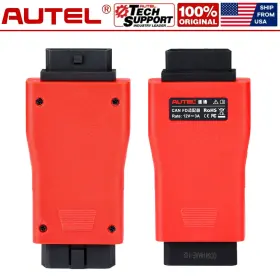
( Brand: Autel ), ( Manufacturer Part Number: W01SO534 ), ( Country Of Origin: China ), ( Obd Interface: Obd ), ( Type: Autodiagnostic Tool ), ( Unit Type: Unit ), ( Vehicle Type: Passenger Vehicle ), ( Warranty: 1 Year )
Review AUTEL Can Fd Adapter Work Vci Connector For Diagnostic Scanner Tool
Introducing the Autel W01 SO534 Adapter VCI Connector, a must-have accessory for vehicle diagnostic scanning. This advanced connector is specifically designed to work with Autel MaxiSys DS808, MS908, and MS708 series diagnostic scanning tools.
The Autel W01 SO534 Adapter VCI Connector boasts a robust and durable design, with a sturdy housing that can withstand the rigors of daily use in a garage or workshop. It features 16 high-definition LED lights that provide clear visual feedback during diagnostic scanning, making it easier to identify fault codes and troubleshoot issues.
This connector is equipped with the latest VCI (Vehicle Communication Interface) technology, which allows it to connect to a wide range of vehicles, including European, Asian, and domestic models. It supports multiple protocols, including J1850, KWP2000, CAN, and SAE J1962, ensuring comprehensive coverage for various vehicle makes and models.
The Autel W01 SO534 Adapter VCI Connector also includes advanced features such as I/M data monitoring, live data streaming, and bidirectional control. This enables users to perform more in-depth diagnostic tasks, such as adjusting vehicle parameters, clearing codes, and activating service functions.
The connector comes with a 16-pin OBD-II socket, which is compatible with most vehicles produced after 1996. It also features a compact and portable design, making it easy to transport and use in different locations.
In summary, the Autel W01 SO534 Adapter VCI Connector is an essential accessory for professional mechanics and DIY enthusiasts who require a reliable and versatile diagnostic scanning solution. Its advanced features, high-definition LED lights, and compatibility with various vehicle makes and models make it a valuable addition to any garage or workshop.
The Autel WO1SO534 adapter is a valuable addition to diagnostic scanning tools for vehicle repair and maintenance. This adapter enables communication between various diagnostic tools and specific vehicle makes and models, expanding the capabilities of the scanning tool. Here are some pros and cons to consider before purchasing the Autel WO1SO534 adapter:
Pros:1. Compatibility: This adapter supports a wide range of vehicle makes and models, including popular brands like Ford, GM, Chrysler, and many European models. Having a single adapter that supports multiple vehicles can save time and money compared to purchasing multiple adapters.
2. Flexibility: The Autel WO1SO534 adapter offers flexibility in terms of usage, as it can be used with various diagnostic scanning tools from different manufacturers. This adapter is not limited to use with a specific scanner.
3. Cost-effective: Compared to purchasing multiple adapters for various vehicle makes and models, the Autel WO1SO534 adapter is a cost-effective solution. It simplifies the diagnostic process by providing a single connection point for multiple vehicle types.
4. Improved diagnostic capabilities: With the ability to communicate with a wider range of vehicles, the Autel WO1SO534 adapter enhances the diagnostic capabilities of the scanning tool, allowing for more comprehensive vehicle inspections and repairs.
Cons:1. Limited compatibility with some vehicles: Although the Autel WO1SO534 adapter supports a wide range of vehicles, it does not cover every make and model. It is essential to verify compatibility with the specific vehicle before purchasing the adapter.
2. Requires additional tools for certain repairs: While the Autel WO1SO534 adapter expands the diagnostic capabilities of the scanning tool, it may not cover all aspects of vehicle repairs. Additional tools and equipment may be required for more complex repairs.
3. Depends on the diagnostic scanning tool: The Autel WO1SO534 adapter cannot function without a compatible diagnostic scanning tool. It is essential to ensure that the scanning tool is compatible with the adapter and the specific vehicle being diagnosed.
In conclusion, the Autel WO1SO534 adapter is a valuable investment for vehicle repair and maintenance professionals who work on various makes and models. It offers improved diagnostic capabilities, flexibility, and cost-effectiveness compared to purchasing multiple adapters. However, it is essential to verify compatibility with the specific vehicle and diagnostic scanning tool before making a purchase. Ultimately, the Autel WO1SO534 adapter can save time and money by simplifying the diagnostic process for multiple vehicle types. Therefore, it is recommended for professionals who work on a diverse range of vehicles.
Details:
Next, tap the VCI firmware version and if an update is available, Update for new to install. Tap the VCI icon on Tablet toolbar. Warranty: Before shipping out, all goods have been double verified.
Expanded Vehicle Coverage for GM Ford. Autel CAN FD Adapter Chinese Version Compatible with VCI work for Marxists Series Tablet. SUPPORT CAN FD PROTOCOL Autel Adapter is designed to support diagnosis of vehicle model's with protocol, including the MY2020 GM. Compatible with Autel Scanners.
Autel CAN FD Adapter is a must-have connector for checking the newer GM vehicles. A progress bar will display as the update is installed. CAN FD Adapter Features. CAN FD Works With Following model's.
Our test engineer will check for quality, including the basic function of hardware and software, appearance, packing, necessary accessories power adapter plug standard. The tablet will then connect to the VCI. Compatible with a supported Autel vehicle communication interface VCI to communicate applicable vehicles. To update the VCI, use power supply and plug in Marxists tablet to electrical outlet.
PORTABLE EASY TO USE This CAN FD Adapter is compact, portable and easy to use. COMPATIBLE WITH AUTEL VCI The adapter is compatible with a supported Autel vehicle communication interface VCI, including Autel Maxi Flash Elite J2534-VCI, Wireless Diagnostic Interface, 100 and Mini. How to connect CAN FD Adapter. Step1: Connect the main cables female adapter to vehicle Data Link Connector DLC on VCI unit and tighten captive thumb screws.
Once completed, follow the instructions displayed and reboot VCI by detaching USB cable from then plug back into. Small size and easy to carry, superior flexibility durability. A message will display once the VCI update is completed. Prior to use, update the VCI with latest firmware.
The package box language is Chinese and label on main unit also Chinese,but the of device English,it doesn't effect to use. Attach the supplied USB cable to Marxists tablet.
part #: w01so534 price
- $59.95
specifications diagitools:
- for makes: Can
- brand: Autel
- mpn: W01so534
- country of origin: China
- obd interface: Obd
- type: Autodiagnostic Tool
- unit type: Unit
- vehicle type: Passenger Vehicle
- warranty: 1 Year
offer diagitools:
- availability: In Stock
- best offers: True
- started: December 4, 2025
- quantity: 10
- sold: 0
- options: Ship-to-home
shipping diagitools:
- class: Standard
- type: Fixed
- cost: $0.00
- service: Standard
- transit: 4-8 Days
general diagitools:
- condition: New
- Automotive Tools Supplies > Diagnostic Service Tools > Other Diagnostic Service Tools
payments diagitools:
- other
- wallet: Paypal
- credit card: Mastercard
seller diagitools:
- rating: 98.3%
- # reviews: 10063
- city: Perth Amboy, New Jersey
returns diagitools:
- paid by: Seller
- policy: Returns Accepted
- time: 30 Days
Autel W01SO534 Is Similar To:
- Autel Apb112 Smart Key Simulator For Programmer Untested Powers On (36.7% similar) Share this offer with someone who wants it. Key features: - smart key simulation: ability to simulate smart functionality for diagnostic and programming tasks. It can also simulate various vehicle key chips for diagnostic and programming purposes. Chip compatibility: the simulator currently...(May 14th, 2024)
- Autel 849438004958 Aulmsultra Maxisys Ultra Diagnostic Tablet With Advanced Vcmi (39.8% similar) The condition of the item you are purchasing will clearly be marked on listing page. Autel Marxists ultra diagnostic tablet with advanced vci Autel, certified refurbished fully functional fully-functional product in like new/very good condition that may or not have minor cosmetic...(May 28th, 2024)
- Autel Km100 Maxiim Key Fob Programmer Immobilizer Tool (40% similar) Pawn America key technical specifications: : brand: Autel. See images for details, reference. Type: key fob programmer. Manufacturer part number: KM100. Whats included: : Autel maxim KM100 2024 key fob programmer immobilizer tool, case, key fob, power cord condition tool is pre-owned...(August 7th, 2024)
- Autel Ia900ldw Maxisys Adas Lane Departure Warning Calibration Tool (30.7% similar) However, keep in mind that the shine may make it look slightly different and due to color wear tear of your wheel. The color differences are usually minimal and not noticeable, but they do exist. Color matching. The effect of brake dust and road debris can be seen on a car with just few weeks...(November 13th, 2024)
- Autel K001so534 Can Fd Adapter For Mx808 mk808 mk808s mk808ts mx808ts mp808 ds708 ds808 (41.7% similar) To update the vci, use power supply and plug in Marxists tablet to electrical outlet. Buyer pay the shipping cost. Support can fd protocol Autel adapter is designed to support diagnosis of vehicle model's with protocol, including the MY2020 gm. Small size and easy to carry, superior flexibility...(December 9th, 2024)
- Autel So534-cn Can Fd Adapter Compatible With Vci Work For Maxisys Series Tablets (65.4% similar) Next, tap the vci firmware version and if an update is available, update for new to install. Autel has just released a can fd adapter that connects to compatible vehicle communication interfaces cis enable its tablet's communicate via the communications protocol and diagnose vehicle...(December 11th, 2024)
- Autel Ap2500e Maxiap Obd2 Scanner Dongle Wireless Bluetooth Diagnostic Tool Code (43.5% similar) Note: if the vehicle uses a controller area network can protocol to communicate, this function is not supported by. Supports late model vehicles using faster Canad communications. Product features. Perform all-around code reading clearing and quickly locate problems. Obit full tests...(December 12th, 2024)
- Autel Sk282bea01 Xp400 Pro Chip Coding Immo Work For Im508 Im608 im608 (31.4% similar) One-tap online programming. For BMW fem/BC k-EU learning and adaption. Engine ec.u read/ write. Package list. Fit for vols-wage/ Audi. 4.ENABLES programming of infrared k-yes for Mercedes vehicles and ic chip on late model Hyundai KIA. Advanced programming functions. Fit for Mazda...(December 12th, 2024)
- Autel So344-b Maxivideo Mv108s 8.5mm Digital Inspection Camera Work With Maxisys (33.5% similar) USB cable connects the digital inspection camera to Marxists tablet or PC for data analyzing. White led lights to illuminate the inspection areas. MV108S can work with Autel tablet's such as Marxists ultra, ultra lite, Marxists elite ii, maxi com MK908P, MK908, MS906BT, MK906BT, MS906TS, MS906 pro...(December 16th, 2024)
- Autel Sp405ea01 Maxivci V200 Vci Bluetooth Diagnostic Interface Fit For Ms906 Pro Its600 (44.7% similar) Vehicle/connection led. Autel maxi vci V200 wireless diagnostic interface is a small box used to connect vehicles connector DLX and tirelessly with the Marxists display tablet, as well standalone PC, vehicle communication vci for data transmission. Enables the Autel tablet's to connect vehicles...(December 18th, 2024)
- Autel 712217364409 Maxivci V200 Obd Connector Car Communication Interface For Mk906 Pro Km100 (36.8% similar) Solid blue: the vci is connected via Bluetooth. Flashing blue: the vci is communicating via Bluetooth. Consult a licensed mechanic or automobile service center. The Cl is powered on and performing self-check. Pull off the roadway immediately or as soon it is safe to...(December 19th, 2024)
